MP4 vs WebM vs Audio-Only Streams: Which Video Format Should You Save?
Choose MP4 for broad compatibility, WebM for efficient browser storage, or audio-only for listening. Compare codecs, devices, and download options.
MP4, WebM, and audio-only formats explained
For most public Facebook clips, MP4 with H.264 video and AAC audio is the safest save format. It works across iPhone, Android, Windows, Mac, browsers, editing apps, and many televisions. Choose WebM for smaller browser-oriented files when every target device supports it. Choose audio-only when watching is unnecessary. Before saving, confirm whether the format includes picture and sound or only a single track.
MP4 and WebM describe containers and codecs differently. An MP4 container usually carries H.264 video and AAC audio, though it can contain other codecs. H.264 is the established compression system, while AAC provides widely compatible compressed audio. WebM is an open container commonly associated with VP9 or AV1 video and Opus or other supported audio. Compatibility depends on the complete codec combination, not only the file extension.
When a source provides separate tracks, the picture may save correctly while the audio is missing. The guide to Why Facebook Videos Download Without Audio explains DASH streaming and how to recognize a combined audio and video option.
A format name is not a quality guarantee. Playback quality is influenced by the source resolution, frame rate, bitrate, encoding quality, and available stream. The Facebook Video Downloader displays formats made available for a public video link. It does not create private access or promise every resolution for every post.
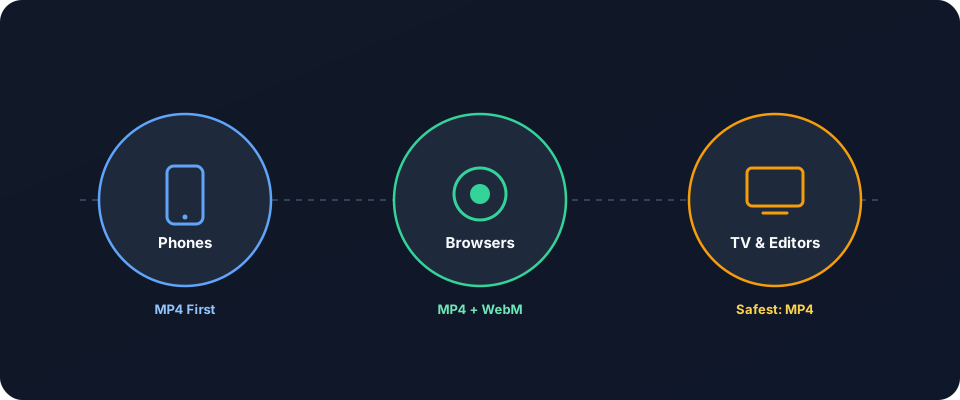
Start by identifying the destination. A phone, computer, smart television, editor, and cloud archive may have different format support. Then compare storage needs and expected reuse. This decision should be practical rather than absolute, since a highly compatible file may be larger while an efficient file may require conversion.
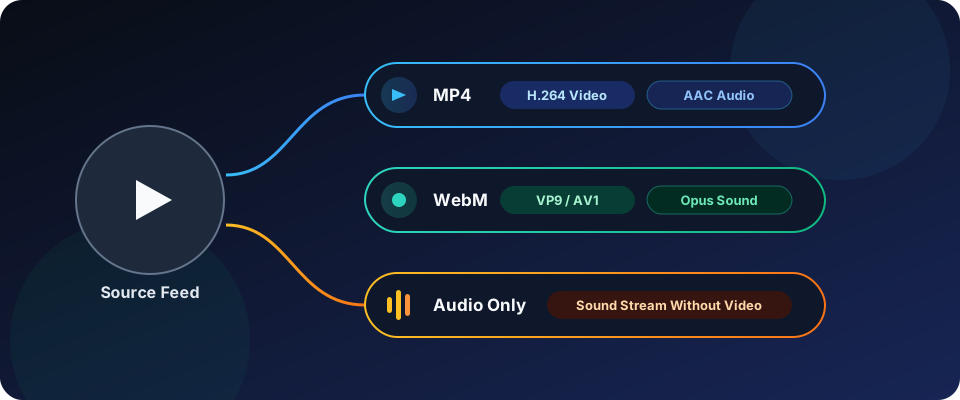
Compare formats and choose the right option
MP4 is the broadest default for saved social clips. H.264 and AAC combinations play directly in QuickTime, Windows Media applications, Chrome, Safari, VLC, and many televisions. MP4 is also familiar to editing software and mobile photo libraries. Its larger size can matter for long recordings or limited phone storage.
WebM is useful when smaller browser files matter. VP9 commonly delivers efficient playback in modern browsers, and AV1 can improve compression for compatible hardware. Opus audio is efficient and clear for speech and music. However, support varies across televisions, older phones, mobile editors, and media players. AV1 playback can also depend on hardware decoding or current operating system support.
Audio-only files remove the picture track and retain the sound. They suit interviews, music, meetings, speeches, and spoken tutorials. M4A with AAC and MP3 are common outputs, while Opus may appear in WebM or standalone packages. Audio-only is usually much smaller than a video file, but it cannot preserve on-screen instructions or visual demonstrations.
Use the Complete Facebook Video & Reels Guide when planning saves across several devices. It covers public-link workflows and device-specific transfer steps that help after format selection.
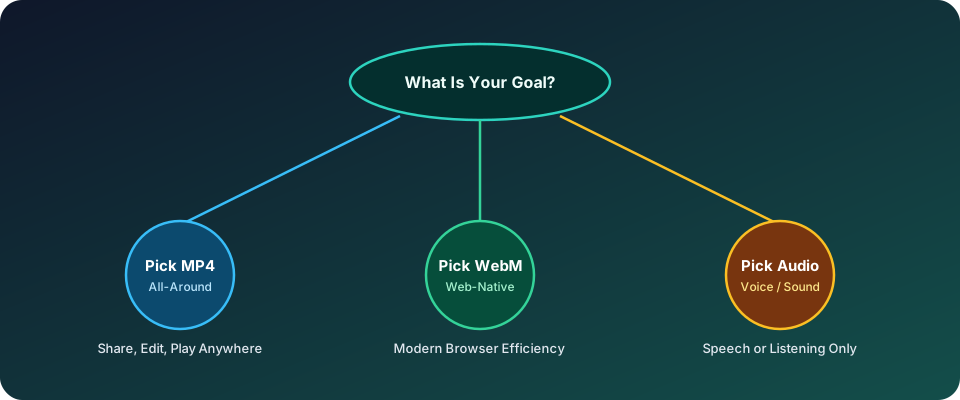
| Use case | MP4 with H.264 and AAC | WebM with VP9 or AV1 | Audio-only |
|---|---|---|---|
| Primary strength | Broad device and editor support | Efficient browser playback | Small size for listening |
| Typical tradeoff | Usually larger files | Not universal on televisions | No picture or on-screen text |
| Best destination | Phones, TVs, editing, sharing | Modern browsers and computers | Audio players and podcasts |
| Check before saving | Resolution and included audio | Codec support and hardware decoding | Audio format and track quality |
Real-world format situations and common mistakes
A phone-first workflow usually favors MP4. iPhone Photos can import compatible MP4 files directly, while Android gallery apps generally recognize H.264 with AAC. The exact import behavior varies by app and OS version. Keeping the original MP4 until the clip opens in the destination app prevents unnecessary format changes.
A desktop archive may be better served by WebM or MP4. Modern browsers handle both, and a browser-oriented archive can save storage. If you later edit the clip in an older application or upload it to a service with limited WebM support, conversion to H.264 MP4 may be simpler than troubleshooting the original file.
Smart television playback is an MP4-first scenario. Use a compatible H.264 MP4, then test a short file before copying a large collection. The TV may read the file from USB, a local network, or a casting app, but its codec support can differ by model. A file that plays in your browser may still be unsupported by the television.
Resolution and device size should guide the source choice as well. The comparison 1080p Full HD vs 720p HD vs SD explains how pixel count, compression, and display size affect clarity and storage.
Do not rename a WebM file to MP4. The extension describes a filename convention, but it does not alter the encoded video or audio. Conversion tools change the container or codecs. Renaming also confuses players and can hide a real compatibility problem.
Another common mistake is choosing a video-only stream. MPEG-DASH and similar delivery systems can expose separate picture and sound tracks. A silent MP4 or MP4 extension may be complete in structure but contain no audio. Read the format label and available file details before download.
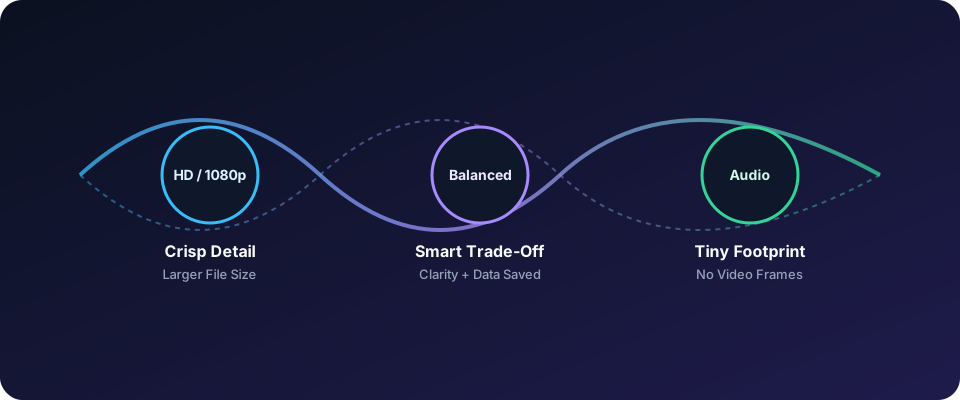
Troubleshoot codec errors and playback problems
Begin with the smallest test. Open the file in a current browser and a known media player. VLC Media Player is useful because it supports many containers and codecs. If it opens everywhere except one app, the problem is usually app compatibility or file association rather than damage.
Check whether a player can show a codec report or media information panel. Confirm the video codec, audio codec, duration, and track count. No audio track indicates a wrong format selection or a split stream. An unknown codec or unsupported hardware decoder can produce a blank image with sound or a direct error.
For a WebM that your TV cannot read, copy the file to the destination computer and convert it to H.264 MP4 with AAC audio. HandBrake or FFmpeg can perform this task, but conversion settings vary. Preserve the original source until the converted file has been opened and checked.
When conversion is not enough or an MP4 reports a codec error, follow the dedicated MP4 Media Player Error and Codec Troubleshooting Guide for a more complete device and file-integrity checklist.
Avoid simply re-encoding from a damaged partial file. Interruptions during browser downloads can leave an incomplete duration or missing atom data. Compare the downloaded size with the expected source, retry from a fresh public link, and keep the original incomplete file separate. Opening it in VLC can reveal whether recovery is possible.
Black video with sound often points to a decoder or codec mismatch. Browser or player hardware acceleration may also be involved. In the test app, disable hardware acceleration temporarily, update the app, then retry. If playback returns, update graphics drivers or enable hardware decoding only after confirming compatibility.
On iPhone, use Files to place the compatible MP4 in a known folder, then import it through Photos if camera-roll access is needed. If Safari downloads an unexpected format, open the link in a new tab and verify the file extension before transfer. Do not install an unknown converter application or grant it broad permissions.
Safe browser habits and responsible use
Save only public posts and clips that you have permission to archive or use. Copyright ownership does not change simply because a video is downloadable or easy to share. Personal viewing may have different limits from reposting, public display, monetized use, or removal of creator attribution.
A browser-based tool should not require a Facebook password or session cookies. Public media workflows can operate from a public share URL without account access. If a page asks for login details, payment for basic format access, or unusual browser permissions, leave and verify the request.
Keep downloads local and review the privacy policy if you need to understand browser processing or data handling. When reporting a broken public link, provide the public URL and the exact file label or error. Never include passwords, account cookies, private messages, or restricted post data.
Remove the source file when it is no longer needed, especially on shared devices. Store authorized copies in a private folder, protect backups, and retain the original creator link for attribution. These habits reduce privacy exposure and make later reuse easier to audit.
Frequently asked questions
Which format is best for mobile and PC?
MP4 with H.264 video and AAC audio is usually the best mobile and PC choice. It plays widely without conversion and imports into many photo, editing, and media applications. WebM may fit a browser-only archive where size matters. Audio-only is suitable only when the picture is unnecessary. This approach gives a strong starting choice for mixed devices.
What is the difference between MP4 and a video-only stream?
MP4 is a container that can hold video, audio, or both. A video-only stream is a specific track choice without sound. It may still use MP4 or be a separate MPEG-DASH segment. Check the format label and track details before saving, and choose a combined option when both picture and sound are required. This distinction prevents a silent download.
Can I convert WebM to MP4 on a phone?
You can convert WebM to MP4 on some phones using established local or desktop conversion tools. Desktop conversion is easier to verify, especially for large files. Keep the original until the converted MP4 opens correctly. Conversion may take time and is not guaranteed to preserve every detail or improve the source quality. Desktop settings may make codec and audio checks more straightforward.
Formats & Quality
Related Articles
9 min read · September 15, 2026
Why Some Facebook Videos Only Download Without Audio (DASH Streams Explained)
Learn why Facebook downloads lose sound, how DASH separates tracks, and how to identify combined or video-only streams before saving or troubleshooting.
Read Article9 min read · September 19, 2026
1080p Full HD vs 720p HD vs SD: How Video Compression Affects File Size
Compare 1080p, 720p, and SD file size, bitrate, compression, and storage so you can choose the best resolution for any phone, browser, or television.
Read Article9 min read · September 24, 2026
How to Convert or Play Saved MP4 Files When Your Media Player Shows an Error
Fix an MP4 that will not play by checking download completeness, codec support, and device decoding before converting. Keep the source while testing it.
Read Article